← BACK TO RESEARCH
AI Video Upscaling
AI Video Upscaling uses artificial intelligence to enhance low-resolution video by increasing its resolution, sharpening details, reducing noise, and improving overall visual quality. It can transform older or lower-quality footage into clearer, more detailed video while preserving natural-looking textures and motion.
Project Brief
The objective is to explore currently available upscaling tools and workflows, with the intention of trialling a range of options. This will help build an updated and comprehensive understanding of upscaling technologies for 2026 and heading into 2027, with the aim of identifying whether any newer approaches can deliver better results than the current workflow.
Current Upscaling Process
The current workflow uses Topaz, which generally produces good results. However, visual artefacts have recently been observed in some projects, making the workflow feel somewhat unreliable.
Custom FFmpeg batch scripts are also used for certain workflows. These scripts provide a reliable method of scaling by duplicating adjacent pixels and applying different blend modes to smooth the image. While this approach is stable and dependable, it does not genuinely enhance the underlying image quality.
FFmpeg Scaling Methods (swscale)
FFmpeg’s internal scaler (swscale) includes several scaling algorithms. Below is a breakdown of the available methods, listed in alphabetical order:
Area: Good for downsampling and effective at reducing moiré patterns.
Bicubic: A widely used standard method that provides a good balance between sharpness and visual artefacts.
Bilinear: A relatively fast method that generally produces slightly better results than Fast Bilinear.
Experimental: A non-standard algorithm intended primarily for testing and experimentation.
Fast Bilinear: Extremely fast, but can result in a noticeably softer or blurrier image.
Gauss: Uses a Gaussian blur kernel to produce a very smooth and soft image.
Lanczos: Highly regarded for high-quality upscaling and capable of producing very sharp results.
Neighbour (Nearest-Neighbour): Preserves hard pixel boundaries. Excellent for pixel art, but tends to appear heavily jagged when used with standard video.
Sinc: Based on a mathematical sinc function. Produces very sharp results but can introduce visible ringing artefacts.
Spline: Produces sharp, natural-looking results and can provide a good balance between detail retention and smoothness.

Testing AI Video Upscalers
The aim was to compare current AI video upscaling tools to determine how they perform and whether any provide a noticeable improvement over traditional upscaling methods.
During the research, it became clear that many popular AI upscaling tools use similar approaches, with comparisons frequently pointing towards Topaz Video AI as a benchmark. This made it useful to test the different models available within Topaz using identical source footage.
One of the main advantages of Topaz is the range of AI models available. Rather than relying on a single upscaling algorithm, it provides nine models designed for different types of footage and restoration requirements.
I also wanted to test ComfyUI, as it provides access to more advanced open-source AI workflows. However, it requires considerably more setup and experimentation than dedicated upscaling software, so this will be tested separately.
A key challenge when comparing AI upscalers is that many tools require paid credits or subscriptions, making it difficult to conduct completely like-for-like testing across multiple platforms. For this reason, the initial testing focused on comparing the different Topaz models against the same source footage.
Topaz AI Models
Topaz currently offers nine AI models, each designed for a different purpose.
Proteus: The default and most versatile model. It balances sharpening, noise reduction and detail recovery, making it suitable for a wide range of footage. It also provides manual control over many processing settings.
Artemis: Designed for compressed or lower-quality video. It focuses on reducing compression artefacts while restoring lost detail without being overly aggressive.
Gaia: Intended for high-quality source footage that already contains a good level of detail. Rather than heavily reconstructing the image, it aims to preserve fine textures while increasing resolution.
Theia: A conservative enhancement model designed to sharpen footage and recover detail while maintaining the original appearance as much as possible. It generally introduces fewer AI artefacts than more aggressive models.
Iris: Primarily designed for restoring faces and improving facial detail in older or lower-resolution footage. It uses facial reconstruction to enhance portraits but can produce an artificial appearance if pushed too far.
Nyx: Specialises in cleaning very noisy or low-light footage by aggressively reducing digital noise before upscaling. This can sometimes remove fine detail if overused.
Rhea: A newer model designed to produce sharper and more detailed results through more advanced AI reconstruction. It can deliver significant improvements but may also introduce noticeable AI artefacts.
Starlight: A premium cloud-based model that performs significantly more AI reconstruction than the other models. It is capable of producing highly detailed results, although it is slower, requires additional processing resources and can still generate visible artefacts.
Starlight Mini: A lighter and faster version of Starlight intended for quicker processing. It generally produces similar results but with slightly less detail.
Testing
Each of the nine AI models was tested using the same source footage to compare their strengths, weaknesses and overall image quality.
Original Test Footage
The original footage was used as the baseline for comparison.
Artemis
Artemis did not produce any obvious AI artefacts. However, there was also little noticeable improvement beyond the increase in resolution.
Gaia
Gaia produced a slight improvement, but it was not a particularly noticeable step up from the original footage.
Iris
Iris produced a heavily AI-generated appearance and was not usable in its current state.
Nyx
Nyx did not appear to improve the footage significantly and introduced noticeable artefacts, particularly around reflections and text.
Proteus
Proteus is the default upscaling model and produced a reasonable result. It did a good job of reducing visible noise and could be useful in certain situations.
However, previous testing has shown that Proteus can introduce AI artefacts. Although it performed well on this particular footage, it cannot be considered completely reliable.
Rhea
Rhea produced a noticeable improvement in image quality, but the output had a distinctly AI-generated appearance and introduced relatively severe artefacts.
Theia
Theia did not produce any significant improvement, although it also avoided introducing obvious AI artefacts. Its more conservative approach may make it useful where maintaining the original appearance is more important than aggressively reconstructing detail.
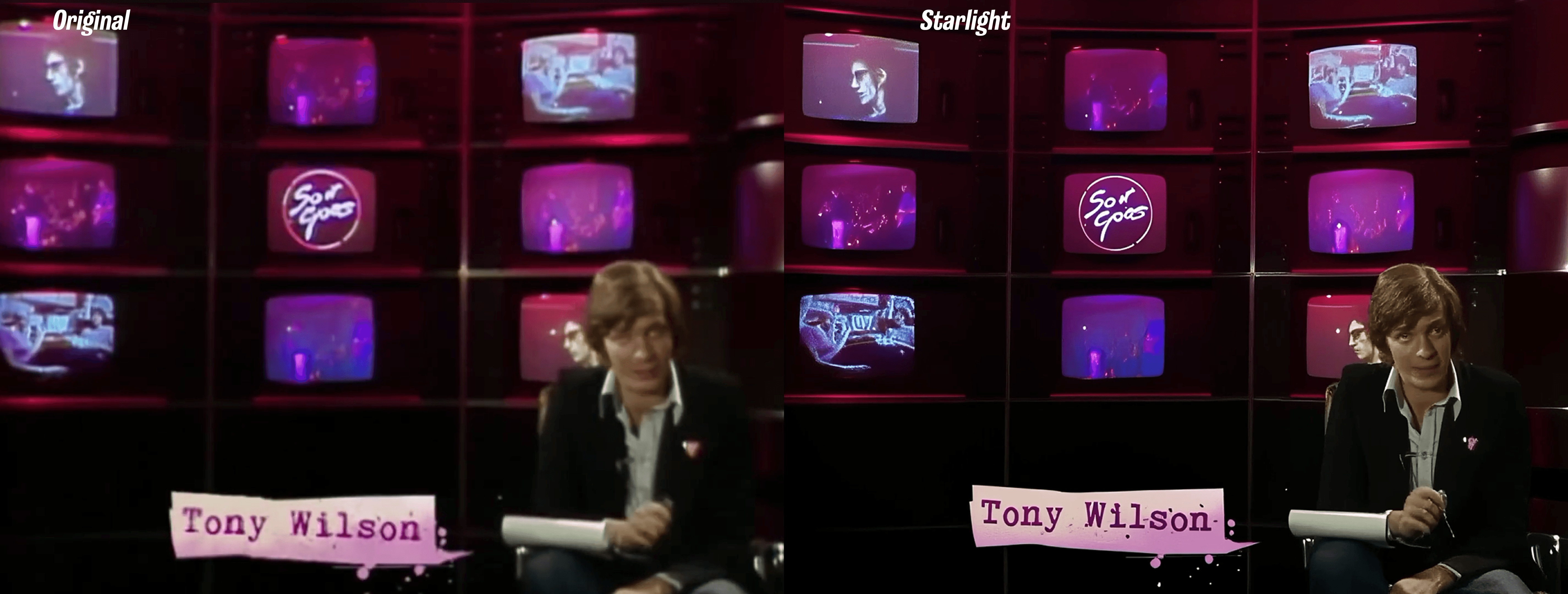
Starlight
Starlight was by far the most impressive video upscaler tested.
Although it still introduced some artefacts, the amount of detail it was able to reconstruct was significantly greater than the other models tested. The results demonstrated a level of detail recovery that was not seen with the other approaches.
It is not necessarily production-ready for every type of footage, particularly where artefacts are introduced, but it is a particularly promising option and worth further testing.
Next Test
The next stage will be to run Starlight on footage that previously produced unsuccessful results during testing. The aim will be to determine whether its stronger reconstruction capabilities can recover more usable detail from footage that other upscaling methods struggle with.
Testing Starlight on the World Cup Footage
The following test uses original footage from the World Cup project before any AI processing. Due to its poor quality, this clip had previously been considered unusable.
One important limitation of Starlight is that it currently supports footage up to 1920 × 1080 (1080p). It also relies on cloud-based processing, which makes it significantly slower than AI models that run locally.
Original Footage
The original footage was used as the baseline for comparison.
The same footage was then processed using the Starlight model to determine whether it could recover enough detail to make the clip usable.
Starlight Output
The results show a significant improvement over the original footage. Although the output is not perfect and some AI artefacts remain, Starlight is able to reconstruct a surprising amount of detail from footage that would otherwise have been considered unusable.
This demonstrates the potential of more advanced AI upscaling, particularly when working with low-quality archive footage or clips that have previously failed when processed using conventional enhancement methods.
Magnific AI
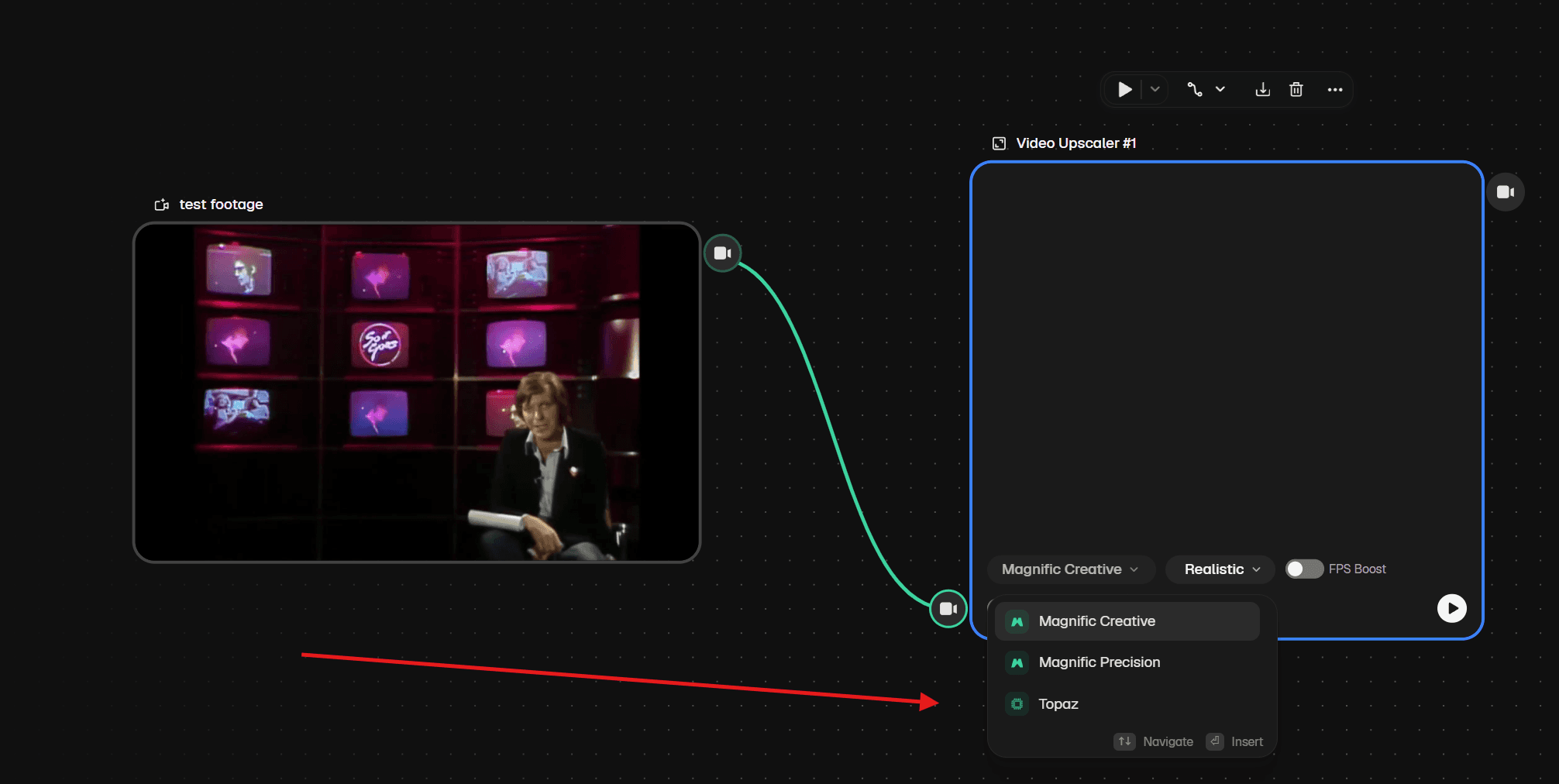
The next stage of testing will focus on Magnific AI. It provides two proprietary enhancement models, as well as an option that integrates with Topaz.
This provides an opportunity to compare Magnific's own AI enhancement models against the results achieved using Topaz.
At the time of testing, processing times were extremely long, meaning these results may take considerably longer to generate than the previous Topaz tests.
Magnific AI Testing
The first Magnific enhancement took almost 30 minutes to process, but the results were promising. It handled larger details and text particularly well, although each enhancement used almost 6,000 credits, equivalent to approximately £5.40. This makes it an expensive option for regular use.
Magnific Precision
Magnific Precision produced a solid enhancement with only minor AI artefacts. Overall, the output was clean and represented a noticeable improvement over the original footage.
Magnific Creative
Magnific Creative produced the strongest result of the two models. Although it was still possible to identify areas where AI had reconstructed parts of the image, the enhancement was significantly more convincing than the Precision model.
Based on these results, Creative was selected for a second test clip.
Running the second test brought the total cost to almost 13,000 credits, equivalent to approximately £14.04. This represents a substantial cost for testing only a small amount of footage.
Second Test
The overall enhancement was good, but the model struggled with smaller text within the image. As a result, the footage would still fail quality control (QC).
Despite this limitation, Magnific is worth keeping under consideration. The underlying enhancement quality is impressive, particularly when dealing with larger details, although the cost and processing time could make it difficult to use as a standard workflow.
DaVinci Resolve Super Scale AI
DaVinci Resolve also offers an AI-powered Super Scale feature. However, it is not entirely clear how much of the process is driven by AI compared with more traditional upscaling techniques.
I was unable to test the feature directly, as doing so would require access to the Studio version of DaVinci Resolve as well as additional time to learn and configure the workflow.
Based on demonstrations and examples reviewed, Super Scale appears to work more like a conventional super-resolution process, similar to traditional FFmpeg-based upscaling, with AI being used to improve the accuracy of the enhancement rather than completely reconstructing missing detail.
The results appear respectable, but they do not seem particularly impressive when compared with the latest AI-based approaches tested here.
ComfyUI
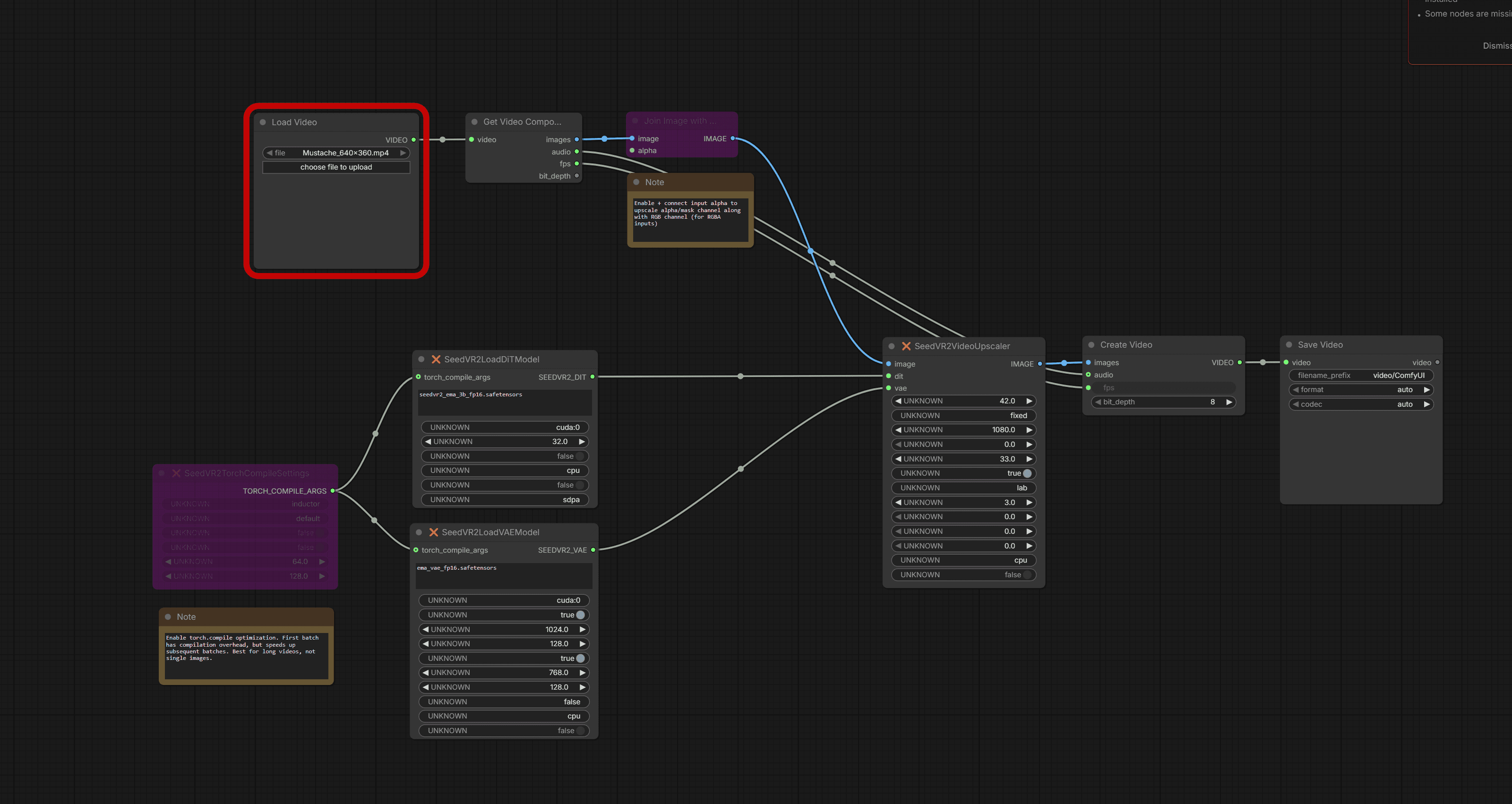
ComfyUI takes a very different approach from the other software tested. Rather than providing a single-click enhancement process, it allows users to build custom AI workflows by connecting different models and processing nodes together.
This provides significantly more flexibility and control, but it also requires considerably more setup and technical knowledge.
ComfyUI can potentially combine different AI models and processing techniques into a single workflow, making it particularly interesting for testing more advanced approaches to video enhancement.
The following section breaks down the workflow and nodes used during testing.
Stable Diffusion
For the first test, I used the Generative Dataset Distillation Based FP16 Safetensors model.
The model produced a significant amount of AI artefacting. Overall, it performed reasonably well, particularly considering that it is a free model, but there were noticeable inconsistencies between frames. Some details would appear and disappear during playback, resulting in an unstable and inconsistent output.
I then tested the same model on the World Cup footage that had previously failed. As the model is free to use, it was worth testing whether it could recover the footage.
Unfortunately, the footage failed again.
Another available model, Generative Dataset Distillation Based 7B Sharp, was also tested.
The results were again not particularly strong, and the footage failed the test.
Real Video Enhancer
Another tool that was identified during the research was Real Video Enhancer. It is a free, open-source application that supports a range of AI models and allows additional models to be added over time.
Three different AI models were tested across both test clips:
JaNai V2
Both test clips were processed using JaNai V2. The results were promising and demonstrated good detail enhancement, although they were not consistent enough to meet the required quality standard.
Open Proteus
Open Proteus was tested against both clips. It produced some impressive results and demonstrated that open-source implementations can compete with more established AI upscaling approaches in certain areas.
However, it still introduced enough inconsistencies and artefacts to prevent the footage from passing quality control.
Spanimation V2
Spanimation V2 was also tested against both clips. Again, the results were impressive in some areas, but the output was not sufficiently consistent for the required use case.
Real Video Enhancer Conclusion
None of the models tested were quite right for this particular use case, but they all produced impressive results considering that the software is free and supports a growing range of AI models.
Unfortunately, the output quality is still not consistent enough to pass QC for pixel-accurate work.
For other types of footage and less demanding workflows, however, Real Video Enhancer could be an excellent alternative to more expensive upscaling solutions. Its open approach, lack of processing costs and ability to incorporate additional AI models make it a particularly promising option for future testing.
Conclusion
A range of current AI upscaling solutions and workflows have now been tested, including commercial applications, cloud-based services, open-source tools and different AI models. The testing has also included a number of online solutions and other approaches identified during the research.
Based on the results, Magnific and Topaz Starlight produced some of the strongest overall results. Both are capable of significant image reconstruction and can recover detail from footage that would otherwise be considered unusable.
However, the overall conclusion is that AI upscaling is not yet sufficiently reliable for large-scale, pixel-accurate production work.
The biggest issue is consistency. AI can produce impressive results when reconstructing larger areas of an image, but it can struggle with small details and introduce subtle changes or artefacts between frames. These are precisely the areas where accuracy is most important.
For workflows where every pixel needs to be correct, relying on AI at scale would introduce too much uncertainty. Each output would require significant manual checking and, in some cases, correction. This would reduce much of the efficiency gained from automating the upscaling process.
As a result, developing a large-scale AI upscaling workflow does not currently appear to provide enough benefit to justify the additional checking and correction required.
For occasional clips that require significant enhancement, however, two particularly strong options have been identified: Magnific and Topaz Starlight. Both can produce substantial improvements to low-quality footage and can be particularly useful for AI-generated content, detail enhancement and other situations where conventional upscaling is insufficient.
For pixel-accurate assets, however, the limitations remain significant. Elements such as logos, text and other small graphical details cannot contain AI-generated artefacts or unintended alterations. Until these systems can consistently preserve this level of accuracy, they cannot be relied upon as a scalable production workflow.
For now, the most practical approach is to treat advanced AI upscaling as a specialist tool for individual problem clips, rather than as a replacement for the existing reliable upscaling workflows.
RESEARCH / FIELD NOTES